Features
You Owe Me App Features
Keep personal, work, family, or debt records in separate Spaces, each with its own people, entries, loans, repayment plans, and total. Capture everyday money by voice with less typing, then use running balances, reminders, sharing, and PDF statements inside the context that belongs together.
Since 2016 Actively maintained and improving. Explore the ten-year story
New to the app? Start with the Quick Start guide to understand the core model before exploring every feature.
Want proof before installing? Read real App Store reviews and review privacy details.
Voice to Entry
One dictation.
Multiple entries.
Describe what happened by voice or typed text. Create one regular entry or several, split a bill, link a payment to an existing loan, and confirm a new person—even before you have added your first person.

“Yesterday I lent Alex 50 euros for groceries. Today Sam paid me back 20 euros for lunch.”
Two distinct entries
You → Alex
€50 EUR
Groceries Yesterday
Sam → You
€20 EUR
Lunch Today
Name the loan with the payment. “Alex paid me €50 towards his Car loan” can link to Alex’s existing Loan Record. Unclear loan matches need review and selection. See loan payments by voice.
You stay in control. New people need your explicit confirmation. Anything unclear needs review; saved entries have Edit and Undo.
Voice is available to free and paid users, with applicable limits. Transcription and interpretation require an internet connection.
Describe
Tap the AI button on Home. Tap Dictate if recording has not started, describe what happened, then Create entry. Typing works too.
Save
Clear entries for known people can save automatically after validation and allowance checks. Saved entries have Edit and Undo.
Confirm & review
Confirm new people, select among same-name matches, and correct unclear details on individual result cards.
More details, less typing
Speak or type one entry or several for different people or the same person. Mention a person once and they can carry into later transactions when the meaning is clear.
Include the person, amount, money direction, purpose or note, transaction date, currency, recurrence, interest, and a due date or one-time payment reminder. For ordinary entries without an explicit currency, interpretation uses the matched person’s currency, then the app’s default. Bill splits use the app’s default when no currency is stated.
For a quick bill split, state the total, participants and allocation: “I paid 60 euros for lunch; split equally between me, Alex and Sam.” This creates two regular €20 entries, one for Alex and one for Sam. Your own €20 share is excluded.
Payments linked to existing loans
Name the loan under the matched person to link a repayment or additional principal advance. A clear, unique loan name can match among several loans; a generic “his loan” selects automatically only when that person has exactly one eligible loan. “Paid me back” alone never links just because a loan exists.
Duplicate, unclear or missing loan matches preserve the entry for review and selection. Voice does not create a loan or change its terms or repayment plan. Linked payments can keep date, note, currency, recurrence and due-reminder settings; interest belongs to the loan. Explore Loan Records.
New people & unclear details
An unknown named person needs explicit confirmation: review the name and entry, then choose Add person & save entry or Add person & review entry. A person is never created silently. Same-name matches require you to select the right person.
Unclear entries stay unsaved. Open the prefilled editor, correct the details, and save.
Result cards show what was saved and what needs review. Entries beyond an allowance stay visible with an explicit Upgrade action.
Getting started, connection & limits
Open the AI button on Home, even before adding your first person. Adding people first is optional. Tap Dictate if recording has not started, describe what happened, then Create entry. Typing works too. The Voice guide inside the app offers examples whenever you need them.
Record for up to three minutes. Interpretation supports up to ten entries per request, subject to allowances. Voice is available to free and paid users with applicable limits.
Transcription and interpretation need internet. You can still add entries manually and access local records offline.
See the app in action
Explore the main You Owe Me features for capturing entries by voice, separating record contexts with Spaces, tracking IOUs, keeping supporting photos with entries, splitting shared costs, following loans and repayment plans, setting reminders, sharing records, and handling money conversations.
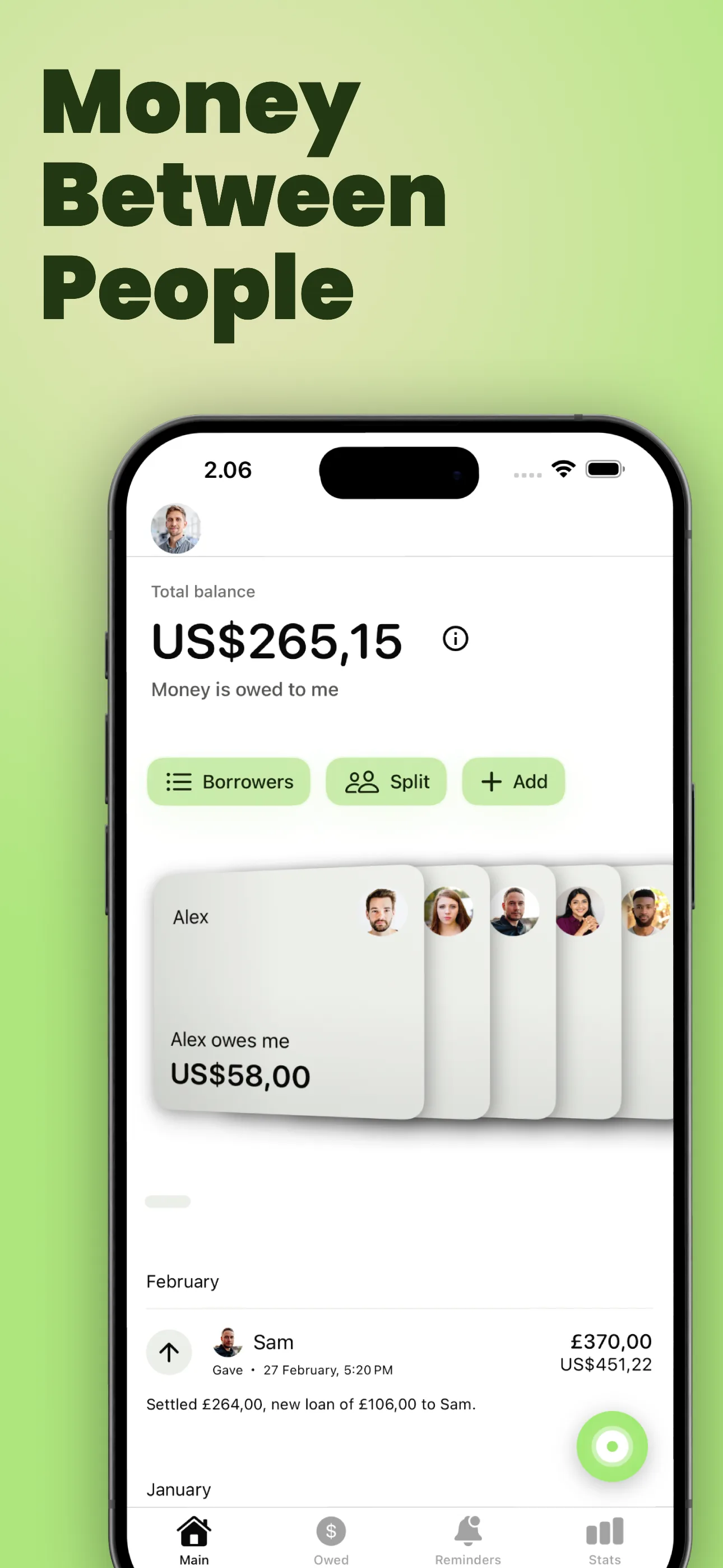
Money between people
Start from people, balances, and the everyday money situations that happen between them.
Log several entries by voice
Speak or type to record entries, split bills, link payments to existing loans, and confirm new people. Regular entries support currencies, repeats, interest and due dates. Clear entries can save after validation and allowance checks; uncertain details need review.
Explore Voice to Entry
Spaces
Keep personal, work, family, or debt records in separate Spaces. Each Space has its own people, entries, loans, repayment plans, and total.

One running balance
Keep IOUs, shared bills, repayments, and partial paybacks in one clear history. When you no longer expect an eligible IOU to be repaid, close it as unpaid and keep the record.
Balance Sync
Privately connect one balance between exactly two You Owe Me users, so connected entries added or changed on either phone stay aligned.
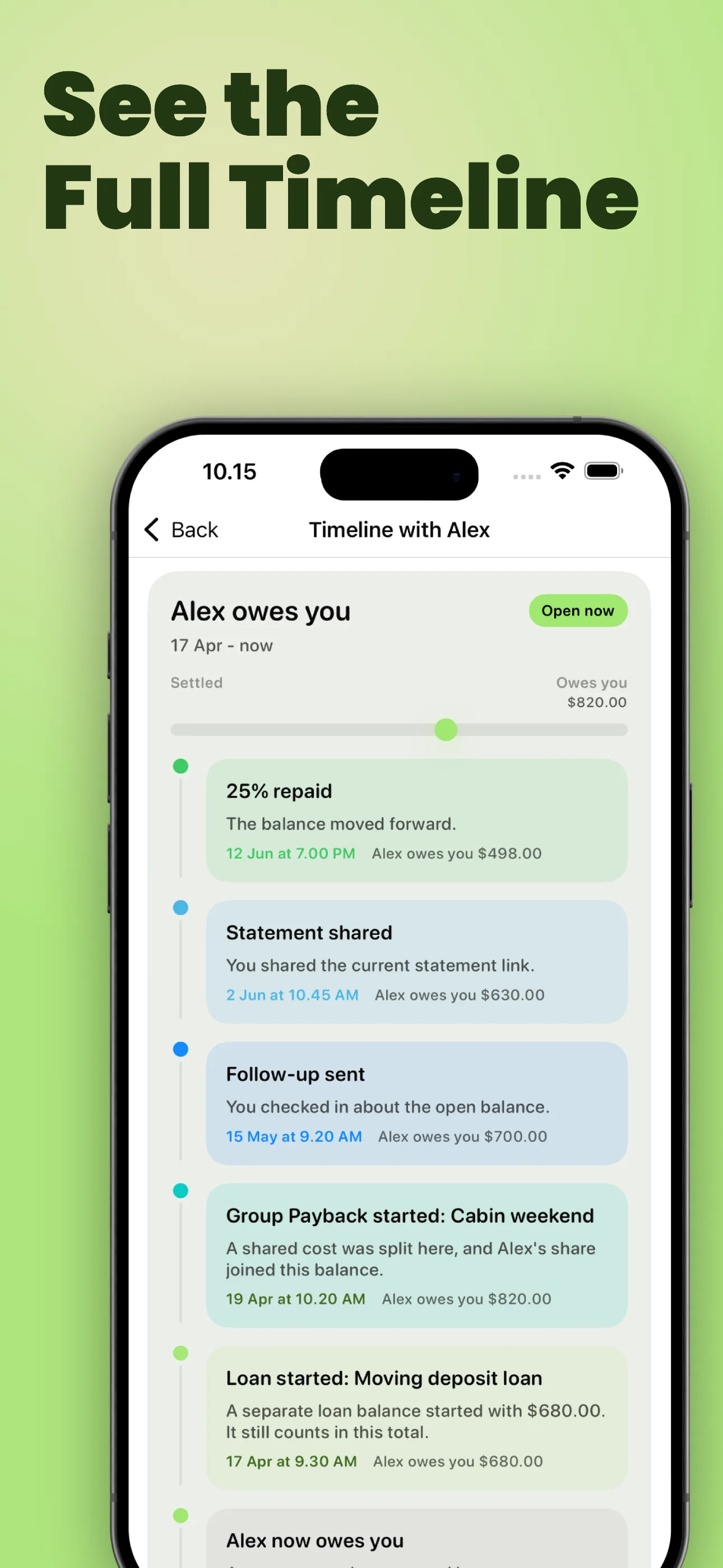
Relationship Timeline
See repayments, statements, follow-ups, Group Paybacks, and Loan Records in one chronological history with each person.
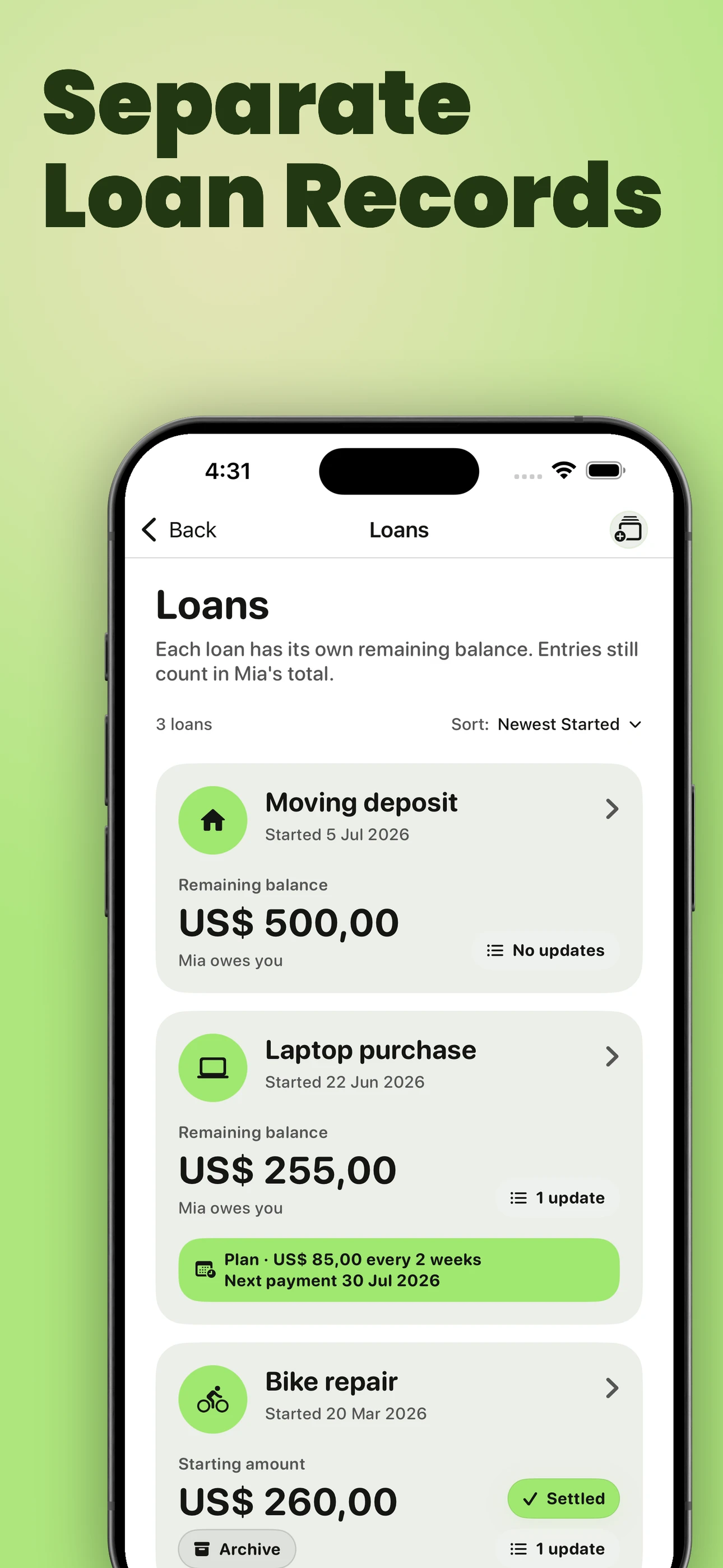
Separate loans
Keep each loan named and separate, with its own balance and history, while everything still counts toward the full balance with that person.
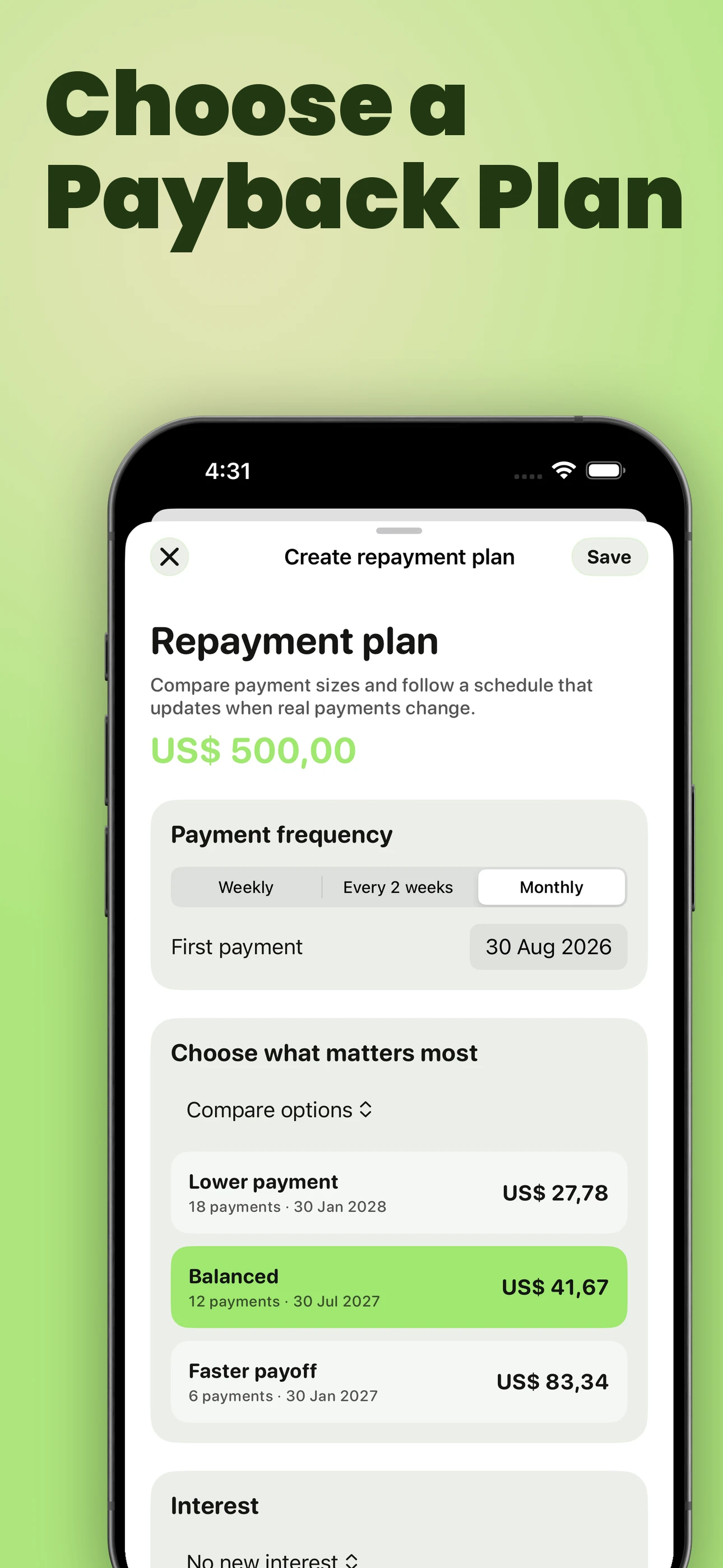
Repayment plans
Compare practical payoff options, then keep the schedule current as real payments are recorded.

Know when to follow up
Smart Money Check-Ins help you notice when silence, promised dates, or repayment progress need attention.

Know what to say
Money Conversations turn the real balance and history into calmer follow-up, ask-for-loan, and repayment update messages.

Share a live balance
Share an always-current balance in a browser link without requiring the other person to install the app.

Split Entry
Create one shared expense, split it equally or exactly, and save clean per-person balances without duplicate entries.

Group Paybacks
Track a shared cost you paid for until everyone pays. See who paid, who partially paid, and who still owes while each person’s balance stays correct.
Open group payback tracker
Recurring bills
Use recurring entries for rent, utilities, subscriptions, allowances, and repeated household or family costs.

Payment reminders
Set reminders for due dates, bills, balances, and follow-ups, then come back to the right person or payment when it needs attention.
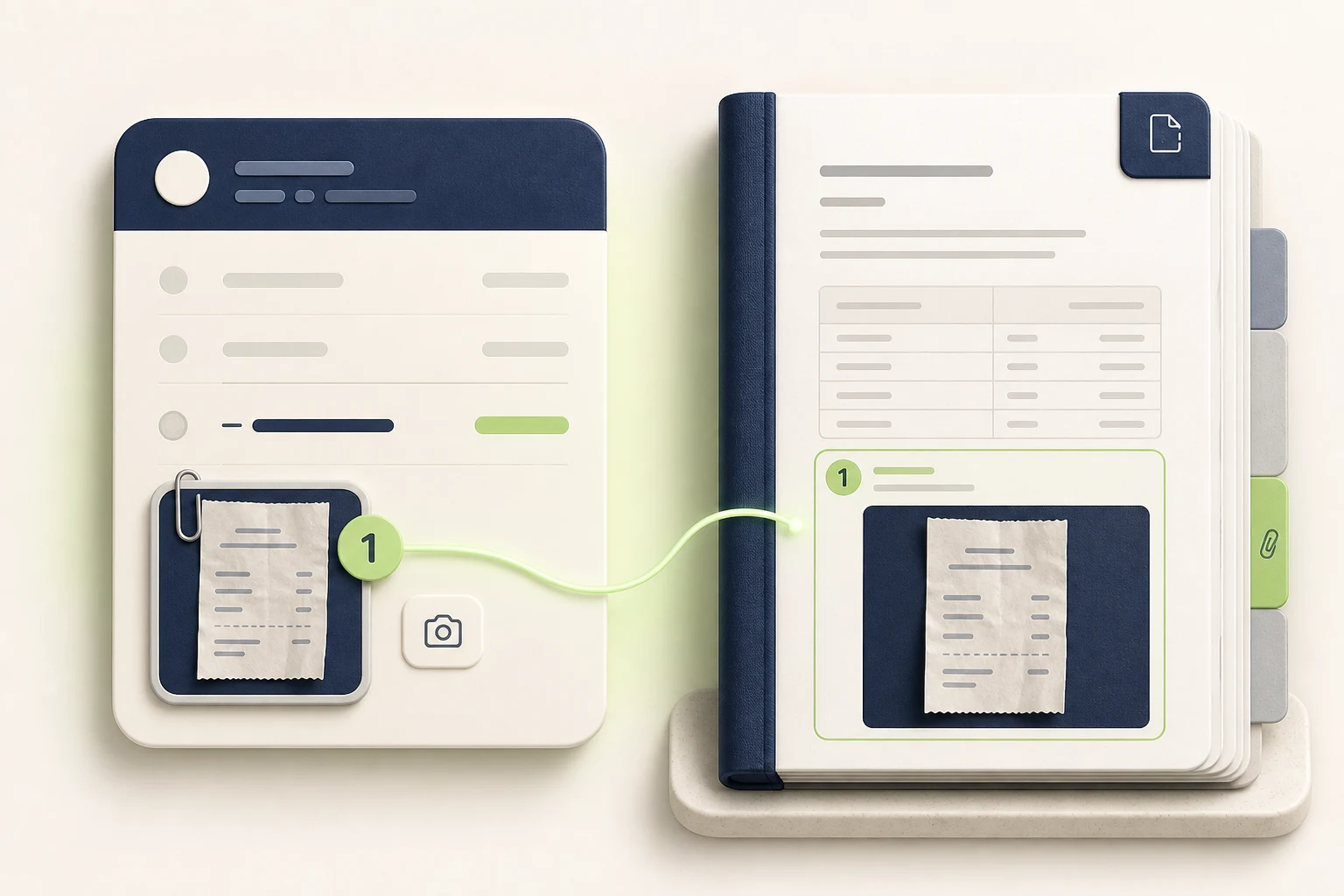
Receipts & supporting photos
Attach one photo to an entry or loan, then optionally include it as a dedicated appendix page inside the PDF you share.

Share clear records
Create clear PDF statements for family reimbursements, clients, larger balances, or formal summaries.

Track interest
Add percentage interest that grows over time, or add one fixed interest amount when the extra charge is already agreed.
Keep personal, work, family, and debt records separate with Spaces
Spaces are separate top-level record collections inside You Owe Me. Use one for Personal, another for Work, another for Family, or a dedicated Debt & loans Space. Every Space keeps its own people, entries, Loan Records, repayment plans, and total; totals are not combined across Spaces.
A separate total for every Space
When different parts of life should not share one total, give each context its own Space. Personal reimbursements can stay apart from client records. Family support can stay apart from formal debts. Every Space has its own people and money history, so opening that Space shows only the records that belong there.
What stays inside one Space
- People and their running balances
- Entries, repayments, and shared-cost history
- Loan Records and repayment plans
- The Space’s own total
Spaces separate record contexts. They do not create separate bank accounts or accounting books.
Start with the records already on your device
After unlocking Spaces, use the people, entries, loans, and repayment plans already on this device as your first Space. Linked reminders stay active, so setting up the first Space does not require rebuilding the history by hand.
Create and select the context you need
Create additional Spaces for Personal, Work, Family, Debt & loans, or another context that makes sense to you. Select a Space to load its people, entries, loans, plans, and total without combining them with another Space.
One-time unlock with backup and sync
Spaces is a one-time in-app purchase. The unlock includes unlimited Spaces, an independent You Owe Me cloud backup, and synchronization across your devices. Sign in inside the app to create or select a Space and start backup and sync. The localized price is shown in the app.
Spaces is for organizing You Owe Me records. It does not connect to banks, move money, build a budget, replace accounting software, or choose which loan should be repaid first.
Spaces FAQ
What is a Space in You Owe Me?
A Space is a separate top-level collection of You Owe Me records. It has its own people, entries, loans, repayment plans, and total, so personal, work, family, or debt records do not have to be combined.
How many Spaces can I create?
The one-time Spaces unlock includes unlimited Spaces. The localized purchase price appears inside the app.
What happens to my existing records when I set up Spaces?
You can use the people, entries, loans, and repayment plans already on the device as your first Space. Linked reminders stay active.
Do Spaces include backup and sync?
Yes. Spaces includes an independent You Owe Me cloud backup and synchronization across your devices. Sign in inside the app to create or select a Space and start backup and sync.
Are totals combined across Spaces?
No. Every Space keeps its own people, entries, and total. Opening one Space does not combine its total with another Space.
Balance & records
Keep the actual money story clear: who paid, who repaid, what changed, what was shared, and where things stand now.
Running balances
Every entry updates one clear balance per person, so you can see who owes whom without rebuilding the history from chats, notes, bank transfers, or memory.
This is also useful for temporary support, where one person covers rent, groceries, bills, or other help and repayments happen later in steps.
With Balance Replay, you can scroll back through entries and see who owed what around the moment you are reviewing.
Learn what a running balance means and how it works.
If you are still deciding whether notes, spreadsheets, payment history, calculators, split apps, or You Owe Me fit best, compare the best way to track IOUs between people.
Main use cases
- Long-running IOUs with friends or family
- Couple, roommate, or client balances that change over time
- Partial repayments and shared expenses in one balance history
See how this applies to roommate bills and shared household costs.
See shared expense tracking
Close as unpaid
Close an unpaid chapter. Keep the record.
When you decide you no longer expect an IOU to be repaid, your balance should reflect that decision. Close an eligible entry as unpaid to remove the written-off amount from the balance while keeping the original entry in history.
The record clearly says Closed as unpaid. No payment is recorded. If circumstances change, choose Reopen debt to return the amount to the balance.
A simple example: You recorded a $100 IOU and received $40 back. If that leaves $60 outstanding, closing it as unpaid removes the remaining $60. Your history still shows the original $100, the real $40 repayment and the $60 write-off.
Which entries can I close as unpaid?
Close as unpaid is available for eligible individual entries with an outstanding balance in the same direction. It does not currently apply to Loan Records, repayment plans, interest-bearing or recurring entries, Group Paybacks, or entries connected through Balance Sync. Archived and future-dated entries are also excluded. The app shows the amount and resulting balance before you confirm.

Balance Replay
Scroll through your entry history and the balance updates with the moment you are viewing. Instead of seeing only today's total, you can understand who owed what around older entries, repayments, and interest as it stood then. Percentage interest is date-aware; fixed interest stays as the one amount added to the entry.
Main use cases
- Checking what was owed before or after a repayment
- Seeing who owed what around an older entry
- Noticing when a balance changed direction
- Reviewing percentage interest using the date being shown
Loan Records
Loan Records keep each loan in its own record without creating another person or losing the wider history between you.
Name a car repair, rent deposit, laptop purchase, family loan, or other balance that deserves its own view. Each loan keeps its own remaining balance, updates, interest terms, status, and optional repayment plan.
The same person can have several loans at once without mixing their purposes together. Every linked payment or update still contributes to that person’s overall balance.
You can also start with an already-in-progress loan: enter what remains today, keep the real historical start date, and add paid-before-tracking context without inventing old transactions.
Repaying a bank, credit union, vehicle-finance provider, or another formal lender? Use the Debt Repayment Tracker to start from a lender-confirmed balance and reconcile the working record with each new statement.
For support that should be repaid gradually, Loan Records can keep one temporary support arrangement separate while the full person balance stays correct.
For the real-life helper-side situation, read how to support someone financially without confusion before turning support into a clear record.
If you only need a quick written note before opening a Loan Record, use the Temporary Financial Support Record Template to capture what was covered, what should happen next, and the check-in date.
If you only need a one-time no-interest calculation, use the free Payment Plan Calculator. When the schedule needs to stay tied to the loan balance and payments, add a repayment plan in the app.
Each loan stays visible in Timeline too, including when it started, when its plan changed, and when it was settled.
Main use cases
- Larger or longer-running loans
- Multiple balances with the same person
- Repayments that need to stay tied to the right loan
- Family loans, rent deposits, larger purchases, repairs, or existing loans brought into the app
Import your loan history
Already tracking a loan in notes, a spreadsheet or on paper? Bring its history into You Owe Me without entering every payment again.
Start with pasted notes, CSV, Excel (.xlsx), Word (.docx), or a photo of typed or handwritten records for one loan. Check and correct the person, currency, dates, repayments and additional advances before saving. Future scheduled payments stay separate from payments that actually happened.
Bring it in. Check it. Keep going.
- Import the history of one existing loan.
- Review the details before they become your saved record.
- Add later repayments and see what remains in the same loan history.
In the app, choose New loan → Import loan history. You can also review the records on the website and continue on iPhone. Import does not automatically synchronize a spreadsheet or merge into an existing loan; app capacity and plan limits still apply.
See how loan-history import works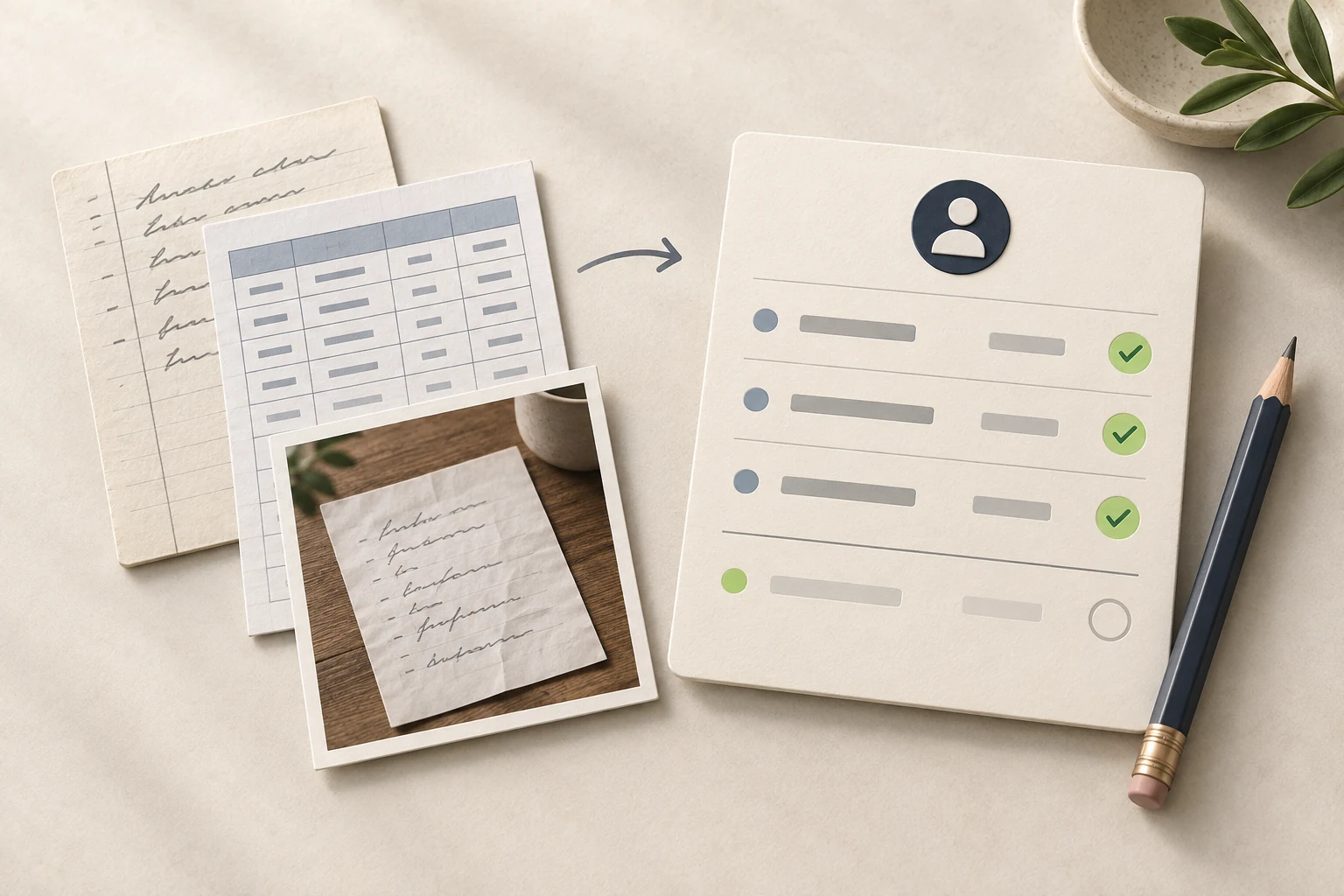
Loan Outlook
See the repayments coming up across your loans without opening each one. Loan Outlook brings your open Loan Records and repayment plans into one view, with separate To pay and Expected back cards.
Choose this week, this month, or a custom date range, then browse the calendar or payment list. Overdue amounts stay visible separately, while loans without a known date have their own No agreed payment date section.
Review loans in your selected Space or local records, or focus on one person. Totals stay separate by currency, with an optional converted estimate for comparison. Expected repayments still depend on payments happening as agreed.
Open Outlook from Loans in Records or a person’s loans. It can also appear in Relationship Timeline when several loans need a wider view. Open a loan for context, or record a payment when it happens.
Keep loans and real repayments togetherRepayment plans that stay current
Add an optional plan to any active loan when “pay it back later” needs a clearer path. Choose weekly, every-two-weeks, or monthly payments and set the first payment date.
Start from the decision that is easiest to make: compare lower-payment, balanced, and faster-payoff options; enter a regular payment amount; choose a projected payoff date; or choose the number of payments. The app calculates the rest before you save.
The plan uses the same balance and payment history as the loan. If a payment is smaller than planned, the app shows what is still needed for that installment. If it is larger, the extra amount can move the plan ahead. Additional borrowing, corrections, or deleted entries update the remaining schedule, projected payoff, and next reminder.
See what is due next and whether the plan is on track, ahead, due today, or overdue. Interest can be left out, added as one agreed fixed amount, or calculated on the declining unpaid balance.
If circumstances change, start a revised plan from the current balance while keeping the earlier plan in history. Ending a plan stops future schedule tracking and its reminder without deleting the loan or its payments. One active repayment plan is included for free; paid access supports unlimited active plans.
See how a named personal loan stays current after partial, extra, early, or late payments.
Need the manual method first? See what to record for one personal loan before creating a Loan Record.
Explore the Personal Loan Repayment TrackerMain use cases
- Personal or family loans repaid over time
- Plans built around an affordable payment or target date
- Partial, extra, early, or late payments
- Loans that were already underway before tracking began
- Changing a plan without erasing the earlier plan history
- Keeping the next amount, date, and projected payoff current
Relationship Timeline
Timeline connects money movement with money communication. For each person, it brings balance changes, repayments, separate loans, repayment-plan starts and changes, plan-linked payments, follow-ups, repayment updates, loan requests, and shared records into one chronological view.
It can also surface the loan and amount that need attention next—overdue first, then due today, then upcoming—and stays quiet when no action is needed.
Main use cases
- Seeing the full history with one person
- Checking when you last followed up or sent an update
- Keeping separate loans, plan milestones, and plan-linked payments visible inside the relationship
- Seeing when you shared a statement, PDF, Live Link, text history, or CSV export
- Understanding balance phases, settlements, and direction changes
- Seeing a clearer next step before another money conversation
Group Paybacks
Group Paybacks organize one shared thing you paid for — a gift, tickets, dinner, deposit, booking, or small shared purchase — while each person’s real share stays in their own balance history.
Use it when the question is not only “what was the split?” but “who has paid me back, who partly paid, and who still owes?”
Main use cases
- Group gifts
- Tickets and bookings
- Dinner or shared purchase paid by you
- Deposits or reservations
- Office/team gifts
- Small roommate or family shared costs
Group Paybacks are not full trip accounting or a collaborative group ledger. They are best when you paid first and want to track paybacks from each person.
Need a quick status check first? Use the Group Payback Calculator. Need the simple tracking workflow first? Read how to track who paid you back for a group expense.
See the group payback workflow
IOU tracking
Record money lent, money borrowed, informal loans, covered purchases, and everyday IOUs without turning the app into accounting software.
Main use cases
- Money a friend still owes you
- Money you borrowed and want to repay clearly
- Family loans, client balances, and personal payback records

Borrow/lend history
Keep the everyday entry history clear, whether you lent money, borrowed money, paid for something, or received a repayment. The point is to preserve context before details fade.
Main use cases
- Checking how a balance got to its current amount
- Confirming old repayments or partial payments
- Keeping a record for family or client conversations
Partial repayments
Record a repayment even when it does not settle the full amount. The running balance updates immediately, which keeps follow-ups fair and specific. On an active repayment plan, the app shows what the current installment still needs and updates the next reminder to that amount. Need the message wording too? Read how to follow up after someone pays only part.
Main use cases
- Someone pays back part of an IOU
- You repay a balance in stages
- Client or family balances move gradually over time
Notes and entry history
Add context to entries so the future version of you knows what the payment was for. Notes help turn a number into a story both sides can understand.
Main use cases
- Groceries, rent, subscriptions, online orders, and travel
- Explaining a repayment or adjustment
- Keeping cleaner records for formal statements
Keep supporting photos with the record
Attach one photo to an entry or loan—a receipt, invoice, agreement, payment confirmation, or anything else worth keeping. Take it with the camera or choose it from your photo library, then preview, replace, or remove it later.
When you create an account statement or Loan Record PDF, you can include the relevant photos. Each one becomes its own appendix page inside the PDF, matched to the entry with a numbered “Photo” badge and useful transaction context.
Supporting photos stay private to their owner and are not shared with the other person through Balance Sync.
Search and quick entry
Find older amounts or notes quickly and add new entries without friction, especially when you track money often.
Main use cases
- Large histories with many entries
- Frequent family reimbursements or household purchases
- Fast capture before details are forgotten
Multi-currency support
Track balances in different currencies when the real-life situation crosses countries, travel, or people who pay in different currencies.
Main use cases
- Travel expenses and international friends
- Family purchases in different currencies
- Separate balances that should not be merged into one currency
CSV export
Export records when you need a spreadsheet backup, want to review your history elsewhere, or need to preserve data outside the app. Timeline can also show when a CSV history was exported, so sharing and export actions do not disappear from context.
Trying to decide whether a spreadsheet is enough? Start with the broader best way to track IOUs between people comparison, then read the spreadsheet vs app comparison for tracking money owed.
Main use cases
- Personal backups
- Tax-time or client record review
- Moving records into a spreadsheet for analysis
Communication & sharing
The app does not only store numbers. It helps you decide when communication matters, what to say next, and what context you already shared.
Smart Money Check-Ins
Silence is often what makes money situations awkward. Smart Money Check-Ins adds a proactive timing layer by watching real balances, repayment progress, reminders, promised dates, and stretches of silence.
When communication starts to matter, the app suggests the right next step, explains why now, and takes you into a ready-to-send message before tension has time to grow. Timeline places that guidance next to the relationship history that explains it. If you already know you need more time, read how to send a repayment update when you need more time.
Main use cases
- Following up when someone owes you and silence is becoming risky
- Sending a repayment update when you owe someone
- Avoiding repetitive prompts with adaptive resurfacing
Money Conversations
Money Conversations turns your real balance and history into ready-to-send messages for the three situations people avoid most: Follow-Up, Ask for Loan, and Repayment Update.
For temporary support, this helps turn the real balance into a calm ask, repayment update, or request for more time. For a manual starting point, use the repayment update guide.
Choose a tone, adjust details if needed, and keep full control before sending. Messages can include a Live Link so the other person can view the latest statement without installing the app. When you copy or share a Money Conversation, Timeline can record that the communication happened.
Money Conversations can help with clear money messages after you choose to ask, lend, follow up, or update someone. If the right answer is not to lend at all, read how to politely say no when people ask for money.
Need a one-time manual message first? Read the polite reminder guide or browse repayment reminder examples.
Main use cases
- Follow-up when someone owes you
- Ask for Loan when you need help and want to ask respectfully
- Repayment Update when you owe someone and want to keep trust intact
Follow-Up messages
Generate a clear check-in when someone still owes you and you want the message to feel calm, specific, and grounded in the actual balance. Timeline helps you see whether you already followed up recently or shared the details another way.
Main use cases
- Late repayments
- Friendly reminders after silence
- Awkward IOUs where wording matters

Ask for Loan messages
When you need to borrow money, create a clearer request from the real context instead of rewriting the message until it feels acceptable.
For a manual starting point before using Money Conversations, read how to ask family for temporary financial help clearly.
Main use cases
- Asking a friend or family member for help
- Explaining amount, reason, and expectations
- Keeping the tone respectful and direct

Repayment Update messages
If you owe someone, send a clear update that explains what changed, what has been repaid, and where things stand now. Timeline can show when you sent a repayment update, which makes the next message easier to judge. If you need more time before the next payment, use the repayment update guide. If you are sending a partial repayment yourself, the same guide includes a responsible partial repayment update example.
Main use cases
- Confirming a partial repayment
- Keeping trust when you need more time
- Reducing confusion about the remaining balance
Balance Sync
Keep one balance updated in both apps
Connect a balance with someone you trust. Add or update an entry on either phone, and Balance Sync keeps both apps up to date—without sending changes back and forth.
Both people see the same underlying activity and an up-to-date balance from their own perspective. Each person keeps a separate record in their app, so Balance Sync adds two-way participation without turning the balance into a group workspace.
- Private, two-way connection for exactly two You Owe Me users
- Add, edit, archive, or delete supported connected entries from either phone
- Offline changes stay safely stored and synchronize after connectivity returns
- Clear sync status and explicit conflict handling—no silent overwrites
- Names, profile images, reminders, recurrence rules, and attachments stay local

Choose how the other person should participate
You do not need the same setup for every balance. Choose based on whether the other person only needs visibility or also needs to update the record.
| Setup | Best when | Who changes the record | What the other person needs |
|---|---|---|---|
| Keep it private | Only you need the working record. | Only you. | Nothing unless you decide to share a message, receipt, or statement. |
| Live Link | The other person needs an always-current browser view but does not need editing access. | You maintain the record; the viewer gets a read-only view. | No app or account is required to view the link. |
| Balance Sync | Exactly two people both want connected balance activity in their apps. | Either connected person can change supported entries. | Both use You Owe Me and Sign in with Apple. |
Live Link and Balance Sync solve different jobs. Live Link keeps setup on one side while giving the other person an always-current browser view. Balance Sync adds private two-way participation for exactly two app users.
Live Link
Share an always-current balance without requiring the app
You keep the record in You Owe Me. The other person opens one read-only browser link to see the latest balance and history as you update it—without installing the app or creating an account.
Use Live Link when the other person needs visibility but does not need to edit the balance. The same link remains useful as entries, repayments, and the current balance change.
If the main question is whether everyone needs to install the same app, read the one-person shared-money tracking guide.
Main use cases
- Sharing a live balance with family, partners, roommates, or clients
- Replacing repeated screenshots with one current link
- Giving the other person visibility without asking them to install the app
Shareable summaries
Send clear summaries when the other person needs context, whether that is a quick balance explanation, a Live Link, or a more formal PDF statement. Timeline records sharing and export events, so those moments stay part of the money story.
Main use cases
- Reducing back-and-forth questions
- Sharing a balance before a conversation
- Giving people a record they can review later
Comparing YouOweMe with group expense apps?
If you are choosing between collaborative group splitting and You Owe Me’s private running-balance model — including Group Paybacks for shared costs you paid for — compare YouOweMe with Splitwise. If the decision is broader than one brand and you are choosing between a shared expense app and a running balance app, use the focused comparison.
Main use cases
- Deciding whether everyone needs to join the same expense ledger
- Choosing between a quick split, a Group Payback, and one clear per-person balance
- Understanding when Live Links and Money Conversations matter more than a group record
Balance Sync FAQ
Do both people need You Owe Me for Balance Sync?
Yes. Balance Sync connects exactly two You Owe Me users. Both participants need full Sign in with Apple accounts and a compatible version of the app, currently You Owe Me 6.9.4 or later. If only one person wants the app, use Live Link or another shareable summary instead.
How is Balance Sync different from Live Link?
Live Link is the one-way option: one person maintains the record while the other person gets an always-current, read-only browser view without installing the app. Balance Sync is the two-way option: exactly two You Owe Me users can both update supported connected entries from their own phones.
Can Live Link and Balance Sync be active for the same connected person?
Not at the same time. Use Live Link when one person maintains the record and the other person only needs browser visibility. Use Balance Sync when exactly two app users both need to update supported entries.
How does someone connect with Balance Sync?
The sender opens a person, chooses Share and then Balance Sync, reviews what will be shared, and creates a private invitation by QR code or link. The invitation expires after seven days and should only be sent to the intended person. The recipient signs in, reviews the invitation and data disclosure, and accepts the balance into a new, separate person record.
Does Balance Sync update instantly?
Do not treat it as instantaneous or real-time. Synchronization runs after local changes, when the app becomes active, when connectivity returns, and when someone manually refreshes or retries.
What information synchronizes?
Balance Sync synchronizes the supported information needed to reproduce connected balance entries, including amount, debt direction, currency, date, note or reason, entry icon, archived status, and supported interest or linked balance-record information.
What stays private on each phone?
The local name assigned to the person, profile images, entry images and attachments, reminders, recurrence rules, and other local-only settings are not copied to the other user.
Does Balance Sync upload every old transaction?
No. It shares the history needed to reproduce the current balance accurately—normally entries since the most recent point when the two people were even. Older settled history usually stays only on the original device. If the app cannot reproduce the balance exactly, setup is rejected rather than creating an incorrect connection.
What happens if both people edit the same entry?
Only that entry pauses. The user explicitly chooses which complete version to keep, preventing a silent overwrite. Other connected activity can continue normally.
Does Balance Sync work with Group Paybacks?
Not currently. Balance Sync is for a supported balance between exactly two people. Group Payback activity does not synchronize.
What happens when someone disconnects?
Future synchronization stops for both people and the same connection cannot be resumed. Entries already copied to each phone remain as ordinary local data, so disconnecting does not erase either person’s local history.
How many Balance Sync connections are included?
The free plan supports one active or pending Balance Sync connection. Paid access removes the app-level connection limit. Existing connections continue working even when the user cannot create another one.
Shared costs & schedules
For repeated household costs, one-time splits, recurring charges, and balances that keep changing. Try the free Running Balance Calculator to see how expenses and repayments update one current balance.
Split Entry for shared expenses
Record one shared expense instead of rebuilding the same entry person by person. Choose the participants, enter the total once, include your own share when needed, and let YouOweMe turn the result into accurate entries for each real person.
Dinners, tickets, groceries, trips, rent, and client costs all end with clean individual balances, not manual math or duplicate records.
Main use cases
- One shared expense becoming separate balance entries
- Including yourself in the calculation without creating a debt to yourself
- Equal, visual, or exact custom shares for real-world fairness
Group Paybacks for shared costs you paid for
Quick Split is useful when you only need to create one-time split entries. Group Paybacks are useful when the shared cost stays open. Create one Group Payback for the gift, tickets, dinner, deposit, or booking, then track who paid, who partially paid, and who still owes.
Each person’s share is still connected to their own running balance, so the shared record and the personal balance history stay aligned.
For a browser-only status check, try the Group Payback Calculator.
Open group payback trackerEqual splits
Divide a shared bill evenly when everyone has the same share. If you were part of the expense too, include yourself in the math while saving entries only for the people who actually owe you.
Main use cases
- Meals, groceries, household supplies, and trip costs
- Shared expenses where your own share should be excluded
- Fast splits where fairness is straightforward
Custom splits
When a shared expense is not evenly divided, assign each person the right share before saving. The app keeps the total reconciled and carries the correct amount into each person's balance.
Main use cases
- Different room sizes or rent shares
- Uneven groceries or travel contributions
- Couples or families with different agreements
Visual and manual split control
For two or three participants, the draggable bubble view makes uneven shares feel quick and natural. For larger groups or receipt-based splits, manual entry gives exact amount control before anything is saved.
Main use cases
- Quick uneven splits when one person had more
- Exact receipt-based amounts for larger groups
- Shares that stay consistent if the total changes later
Payment reminders
Set reminders for due dates, bills, balances, and follow-ups. A reminder can stay attached to a specific IOU, loan, a person's balance, or a standalone bill, so the nudge still knows what the money is for.
For an active repayment plan, the reminder follows the next unpaid installment. After a partial, full, or extra payment, it updates to the current amount and due date instead of repeating an outdated number.
When a reminder is tied to a person, YouOweMe helps you return to the right balance and choose the next step: record a payment when there is a fixed amount, mark it done, keep it, or follow up based on the current balance.
Main use cases
- Due dates tied to a specific entry, loan, repayment plan, or payback
- Standalone bill reminders for rent, utilities, subscriptions, invoices, or other payments
- Balance and follow-up reminders for people you need to review later
- Upcoming, overdue, completed, and recurring reminder states
Recurring entries
Some money patterns are not one-offs. Rent, subscriptions, allowances, weekly coffees, monthly bills, and shared household costs tend to come back again and again.
Recurring Entries turns one entry into a schedule. Choose the rhythm from daily to yearly, keep it tied to the right weekday or calendar date, and optionally set when it should end. As each repeat comes due, the app creates a real entry so balances and history stay accurate.
For example, if Noah’s half of a monthly internet bill is $30, the schedule creates a new $30 entry when it is due. If Noah repays $20, that repayment leaves $10 open. When the next $30 entry arrives, the current balance becomes $40.
You Owe Me does not read bank or card transactions and does not move money. The bill and repayment happen outside the app; Recurring Entries keeps the agreed record, repayment history, and remaining balance clear.
Main use cases
- Rent, utilities, subscriptions, and allowances
- Every 2 weeks, every 3 months, or yearly repeats
- Repeated household costs that should update the real balance
Rent, utilities, subscriptions, allowances, and repeated household costs
Use recurring entries and reminders together for the payments that keep returning. This is useful for roommates, couples, family reimbursements, and anyone who manages bills for someone else.
For a parent-specific example, see the elderly parent expense tracker or the parent-bill reimbursement workflow. For household costs, read how to track roommate bills and shared household costs.
Main use cases
- Roommate rent and utilities
- Parent subscriptions or online purchases
- Household costs that repeat but still need a clear balance
Formal records
For larger balances, long-running records, clients, family reimbursements, or any situation where a more formal summary helps.
PDF statements
Generate clean, shareable PDF statements from selected entries when you need a more formal summary. A focused loan PDF can show what was recorded, what was paid, what remains open, and the due date or payment details when needed. When a loan has a plan, you decide whether to include a concise repayment-plan summary with the next payment, regular rhythm, projected payoff, interest context, and overdue amount when relevant.
Statements reflect the real balance and history, not a manually rebuilt spreadsheet. Timeline can show when a PDF statement was shared, so the formal record stays connected to the rest of the history.
PDF statements are useful for summaries and records. They are not a replacement for accounting, tax, invoicing, or payment-processing software.
Starting manually? Download the Family Reimbursement Tracker Template for a simple Excel, CSV, or printable PDF log. If the record is mainly parent bills, subscriptions, groceries, pharmacy purchases, and sibling reimbursements, start with the Elderly Parent Expense Tracker.
Main use cases
- Client balances and small business records
- Family reimbursements that need a polished summary
- Long-term balances with percentage or fixed interest
Logo, due dates, and payment details
Add your own logo or image, a due date, and payment details to a statement when the record needs to feel more professional or easier for a client to recognize. This is useful for freelancers, small service providers, tutors, coaches, and other simple client-payment situations where a branded summary is enough and a full invoicing system would be too much.
Main use cases
- Small business or freelancer summaries
- Client-facing repayment records
- Formal family reimbursement records

Payment due dates
Add due dates when timing matters, then use reminders and statements to keep expectations clear. For client records, a due date can make the next step clearer on a PDF statement or shared summary without turning the record into a formal invoice.
Main use cases
- Repayment agreements
- Client or business balances
- Family reimbursements with a known payback date
Interest tracking
Choose the interest mode that matches the agreement. Use percentage interest when the amount should grow over time: enter a rate, choose daily, weekly, monthly, or yearly frequency, and optionally set start and end dates. Use fixed or flat interest when you only need one exact amount added once, such as $10 or $25, with no rate or date calculation.
Once interest is saved on an entry, YouOweMe includes it in balances, entry totals, Loan Records, statements, shared links, and repayment context.
Repayment plans can instead use no new interest, one fixed total interest amount, or annual interest on the declining unpaid principal. Payments apply to unpaid interest first and then principal, so the projected payoff stays consistent with the plan terms.
Main use cases
- Percentage interest that grows over time
- Fixed interest or one-time extra amounts
- Clear repayment summaries with principal and interest context
Long-running balances
YouOweMe is designed for money situations that do not finish in one transaction. The balance can move up or down as entries, repayments, splits, and adjustments happen.
Main use cases
- Family, roommate, couple, or client records over months
- Balances with partial repayments
- Situations where the history matters as much as the amount
Client or small business records
Use YouOweMe for simple client balances and repayment records when you need clarity, not a full accounting or invoicing replacement. You can keep charges, deposits, partial payments, due dates, payment details, and client-facing PDF summaries connected to the same balance history. For the full workflow, see the Simple Client Payment Records solution.
Main use cases
- Freelancer repayment records
- Simple client payback histories
- Clear statements for balances both sides need to review
Convenience, privacy, and reliability
Fast capture, offline access, privacy controls, and sync options help the app fit everyday use.
For a plain-English view of local records, optional cloud features, Live Links, AI tools, exports, reminders, and App Lock, read Privacy and Data in You Owe Me.
A polished app experience in 10 languages
Use You Owe Me in English, Arabic, French, German, Italian, Japanese, Korean, Polish, Portuguese, or Spanish—with the interface thoughtfully localized for each language.
Language availability applies to the app interface. This website is currently available in English only.
Supported app languages
- English
- العربية
- Français
- Deutsch
- Italiano
- 日本語
- 한국어
- Polski
- Português
- Español
Works offline
Add entries manually and access local records even without a connection, so everyday money moments do not disappear. Voice to Entry transcription and interpretation require internet.
Main use cases
- Travel, poor reception, or quick entry on the go
- Private records you want available on device
- Tracking without depending on a live web app
No mandatory sign-up
Start tracking without being forced through an account wall. You can keep simple money records quickly when the need is immediate.
Main use cases
- Quick IOU tracking
- People who want less account friction
- Testing the app before using cloud features
App Lock
Keep your repayment history private with App Lock. Unlock the app using Face ID, Touch ID, or your device passcode whenever you open it, so your balances and personal repayment records stay private even if someone else has your phone.
Main use cases
- Personal balances you want to keep private
- Family or client records on the same device
- Extra privacy for everyday finance data

Sync across devices and multiple cloud profiles
Use cloud sync and multiple cloud profiles when you need records available across devices or want to keep different money contexts separate.
Main use cases
- Moving between iPhone and other Apple devices
- Separating personal, family, or client profiles
- Keeping important balances backed by cloud features
Everything included
All the core tools for clear money records live in one place.
- Unlimited Spaces for personal, work, family, debt, or other record contexts
- Independent people, entries, Loan Records, repayment plans, and totals in each Space
- Cloud backup and cross-device sync included with Spaces
- Running balances
- Balance Replay
- Relationship Timeline
- Loan Records
- Repayment plans linked to Loan Records
- Loan Outlook for upcoming repayments, overdue amounts, and loans with no agreed payment date
- IOU tracking
- Split Entry for shared expenses
- Group Paybacks
- Partial repayments
- Payment reminders
- Recurring entries
- Smart Money Check-Ins
- Money Conversations
- Live Link
- Balance Sync between two users
- PDF statements
- Percentage and fixed interest tracking
- Voice to Entry: speech or typed text, multiple entries, bill splits, existing-loan links and confirmed new people (requires internet)
- CSV export
- Multi-currency support
- App interface thoughtfully localized in 10 languages
- Sync across devices and multiple cloud profiles
- App Lock with Face ID, Touch ID, or device passcode
- Manual entry and local records work offline; voice requires internet
- No mandatory sign-up
Use only the structure your situation needs
Start with one clear record. Add a separate loan, repayment plan, or Space when the amount, timing, history, or context needs more structure.
Want proof from real users first? See what users say about You Owe Me.
Updated