Free Excel and Google Sheets template
Roommate Expense Tracker Spreadsheet
Track rent, utilities, groceries and repayments in one roommate spreadsheet. Choose Excel or Google Sheets, enter the shares you agreed on, and see who owes whom.
Use Excel for a local file or Google Sheets for a copy you can share with your household. Only settling one month? The roommate bill calculator is faster.
Only settling one month? Use the roommate bill calculatorNo You Owe Me account needed. Google Sheets requires a Google account to make and save a copy.
Prefer tracking on your iPhone?
Record shared costs and repayments, and see what each roommate still owes.
Scan with your iPhone camera to get You Owe Me.
Start a new record in the app. Your spreadsheet is not imported.
Free download · In-app purchases available.
View app details on the App Store
Choose the lightest record
Check that this template fits
Use the smallest tool that can finish the job. A spreadsheet is useful when the household needs a reusable manual record—not when one calculation or a short note would do.
One shared purchase
Split one meal, ticket, shop, or other purchase. No ongoing history is needed.
Split one expenseSeveral bills from one month
Calculate one period with different payers, included roommates, repayments, and previous balances.
Calculate this month’s roommate billsRepeated months, maintained manually
Keep expenses, agreed shares, repayments, and a closing position in a workbook you control.
Use this spreadsheetRecurring costs and ongoing follow-up
Keep a current record when copying formulas, carrying balances, reminders, or partial repayments becomes hard to maintain.
See ongoing roommate trackingThe template records shares roommates have agreed to. It does not decide fair rent, create a debt, or replace a roommate agreement.
Choose your format
Get the roommate expense tracker
Excel and Google Sheets include setup, expense and repayment records, an automatic summary and a completed example. Choose the format you prefer. The CSV is a simple ledger without formulas or settlement suggestions.
Excel workbook
Use this version for two to six roommates, equal or custom agreed shares, repayments, opening positions, live summaries, and suggested settlement transfers.
- Seven clearly labeled sheets
- Macro-free formulas and dropdowns
- Blank working rows plus a completed example
- Checks for shares and balances that do not add up
Google Sheets template
Make a copy in your Google Drive for two to six roommates. Record equal or custom shares, repayments and opening balances, then check the summary before settling.
- Seven clearly labelled sheets
- Editable inputs and automatic calculations
- Blank working rows plus a completed example
- Share your copy with the people you choose
Plain CSV ledger
Use this version when you need a portable list of entries rather than an automated workbook. It is intentionally simpler and requires you to calculate shares and balances yourself.
Download simple ledger (.csv)You Owe Me does not receive the expenses you enter. Excel data stays in your file unless you upload or share it. Google Sheets data is stored in your Google account and is accessible to people you choose to share your copy with.
One more bill.
The balance changes sides.
Your spreadsheet keeps the household picture. Follow how one repayment and a new bill change who owes whom.
Follow the record Continue to the workbookYou cover the electricity bill.
Alex’s agreed half of $120 is $60.
May · Alex owes you $60Alex pays you $30.
Record it. $30 remains.
May · $30 remainsThen Alex covers June’s internet bill.
It’s $80; your agreed half is $40.
June · A new agreed shareNow you owe Alex $10.
The balance changes sides. Every entry stays.
June · The balance changes sidesYou settle the $10.
Record the payment. Paid in full.
June · Paid in full-
Keep the next bill clear.
Track agreed shares and repayments in one current record. Start a new record in the app; your spreadsheet is not imported.
You Owe Me · For iPhone Download You Owe Me on the App Store

Inside the workbook
What the workbook keeps separate
A trustworthy roommate record separates what happened from what happened later. Expenses show what was paid and how it was shared. Repayments show money sent between roommates. The summary combines both without erasing either history.
On a phone, swipe sideways to see all columns.
| Sheet | What it is for |
|---|---|
| Start Here | Read the short setup order, privacy note, and boundaries before entering household information. |
| Setup | Add two to six roommate names, one reporting period, one currency, and any verified opening positions. |
| Expenses | Record each shared cost once, who paid it, who was included, and either equal or custom agreed shares. |
| Repayments | Record money sent from one roommate to another without changing the original expense. |
| Summary | Review what each roommate paid, was assigned, sent, received, and currently owes or should receive. |
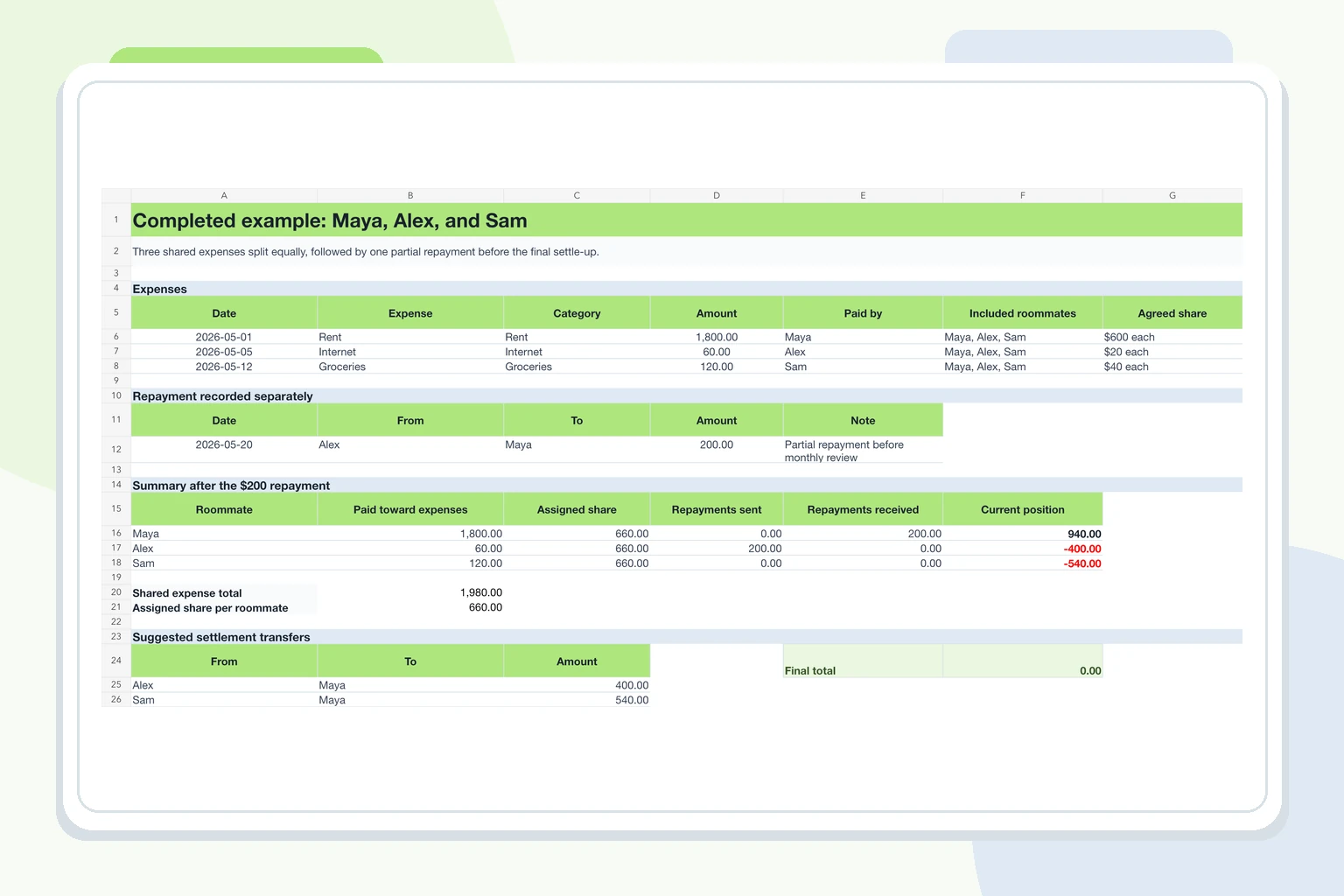
| Example | See the completed Maya, Alex, and Sam example before entering your own data. |
| Settings | Keep the workbook’s categories, split methods, and validation lists in one place. |
Agreed shares, not invented fairness
Use equal shares only when everyone included in that cost agreed to an equal split. Use custom shares for an unequal arrangement that has already been discussed.
Repayments stay visible
A repayment changes the open position, but it does not change who originally paid a bill or how that bill was shared.
One verified carry-forward
Bring a prior closing position into the next period once. Do not carry the same balance forward and record it again as a new expense.
Five-minute setup
Set up the spreadsheet in five minutes
Start on the Setup sheet, then enter each activity only in the input columns. Leave formula cells and summary cells unchanged.
Add the household and period
Enter an optional household name, the month or date range you are reviewing, one currency, and two to six unique roommate names.
Enter an opening position only when one exists
Use the closing positions from the last verified period. A positive opening position means that roommate should receive money; a negative position means they owe money. All opening positions must add up to zero.
Record each expense once
Add the date, expense, category, amount, and the roommate who paid. Do not add a second row just because the cost is being repaid later.
Confirm who shared the cost
For an equal split, include only the roommates who shared that expense. For a custom split, enter the agreed amount assigned to each included roommate and check that the shares equal the full expense.
Add repayments and review the summary
Record each transfer on the Repayments sheet, then review the Summary sheet together before anyone sends the final settlement.
Tip: if a cost is disputed, leave it outside the accepted balance until the roommates clarify whether it belongs and how it should be shared.
Worked example
Three roommates, three expenses, one partial repayment
Maya, Alex, and Sam split three shared costs equally. Maya paid the rent, Alex paid the internet bill, and Sam paid for groceries. Alex then sent Maya $200 before the final settle-up.
On a phone, swipe sideways to see all columns.
| Entry | Paid by / From | Amount | Included roommates | Agreed share |
|---|---|---|---|---|
| Rent | Maya | $1,800 | Maya, Alex, Sam | $600 each |
| Internet | Alex | $60 | Maya, Alex, Sam | $20 each |
| Groceries | Sam | $120 | Maya, Alex, Sam | $40 each |
| Repayment to Maya | Alex | $200 | Not an expense | Recorded separately |
The shared expenses total $1,980, so each roommate’s assigned share is $660.
On a phone, swipe sideways to see all columns.
| Roommate | Paid toward expenses | Assigned share | Repayments | Current position |
|---|---|---|---|---|
| Maya | $1,800 | $660 | Received $200 | Should receive $940 |
| Alex | $60 | $660 | Sent $200 | Owes $400 |
| Sam | $120 | $660 | None | Owes $540 |
The $200 transfer does not erase or rewrite the rent. It is recorded separately, reducing Alex’s open amount and Maya’s amount still to receive.
Starting the next month
If Alex pays Maya $400 and Sam pays Maya $540, everyone starts the next period at zero.
If those suggested transfers have not happened, carry the checked closing positions into the new period once: Maya should receive $940, Alex owes $400, and Sam owes $540. Do not enter those amounts again as new expenses.
Continuing that unpaid-balance example, if Alex pays a new $90 shared bill, split equally, Maya should receive $910, Alex owes $340, and Sam owes $570.
Common situations
Record each roommate cost once
Use one row for each event. Do not change an old expense when a repayment arrives or a balance moves into the next month. Add a new repayment or opening-position row instead.
On a phone, swipe sideways to see all columns.
| Situation | Record it this way | Avoid |
|---|---|---|
| One roommate did not share the cost | Exclude that roommate from the expense. Split it only among the people who used or accepted it. | Dividing every household purchase among everyone by default. |
| Rent is not split equally | Use custom shares that match the arrangement the roommates already agreed to. | Using the spreadsheet to decide what fair rent should be. |
| A roommate paid part of what they owe | Add the transfer once on the Repayments sheet with the date, sender, recipient, and amount. | Reducing or deleting the original expense. |
| A bill was refunded or credited | This template does not support negative expense entries or refunds. Agree and document the correction separately, then verify the closing balances before carrying them forward. | Silently editing a closed period after people relied on it. |
| A prior balance continues | Enter the last verified closing positions once as the next period’s opening positions. | Adding both an opening position and a new expense for the same balance. |
| Two people remember a cost differently | Leave the disputed item outside the accepted balance until the date, amount, payer, or shares are clarified. | Treating the spreadsheet as proof that one person’s memory is correct. |
| One person buys something personal | Leave it out of the roommate record unless another roommate agreed to share it. | Turning the workbook into a personal budget. |
| A roommate moves in or out | Close and review the current period, settle or agree the remaining position, then start a new period with the active roommate list. | Changing names inside a period that already contains shared costs. |
Need help agreeing the rule before entering costs? Read how to split rent, utilities, and groceries with roommates.
Before anyone settles
Review the month before anyone pays
A correct formula is not enough if the inputs are unclear. Review the record together while the expenses are still easy to recognize.
Monthly review checklist
- Every expense has a date, description, amount, and payer.
- Only the roommates who shared each cost are included.
- Custom shares add up to the full expense amount.
- Each repayment appears once and points from the sender to the recipient.
- Opening positions came from one previously verified closing summary.
- Current positions add up to zero before using the settlement suggestions.
- Disputed items are labeled and kept outside the accepted balance.
After someone pays, use the repayment receipt generator to confirm what was paid and whether anything remains.
A shared summary is an invitation to check the record—not a demand, collection notice, or proof that a disputed amount is owed.
Choose the maintenance level
When the spreadsheet is enough—and when it is not
The best method is the lightest one people can keep accurate. More software is not automatically better; a manual file becomes the wrong tool only when maintaining it creates gaps, duplicated balances, or missed updates.
| Method | Best when | It stops being enough when | Next action |
|---|---|---|---|
| Message or note | There is one simple cost and everyone already understands the split. | Several expenses, repayments, or months are mixed together. | Keep the note. |
| Roommate bill calculator | You need one accurate settle-up for the current period. | You need a reusable history after the calculation is finished. | Use the roommate bill calculator. |
| Roommate expense spreadsheet | One person can maintain the file and the household reviews it regularly. | Recurring entries, partial repayments, reminders, or current summaries require repeated manual upkeep. | Download the workbook. |
| You Owe Me | One person needs an ongoing record, calmer updates, repayment history, and a current balance without rebuilding the sheet each month. | It is not the right tool for shared household accounting, payment processing, or deciding disputed obligations. | See ongoing roommate tracking. |
Use the spreadsheet when one person is comfortable maintaining it and the household reviews it regularly. Use You Owe Me only when repeated costs, partial repayments, reminders, or shareable history make manual spreadsheet upkeep unreliable.
When manual upkeep grows
When the spreadsheet becomes hard to maintain
Keep using the spreadsheet if one person can update it and everyone can check it. Move to You Owe Me when recurring bills, partial repayments, reminders, or carry-over balances make the file easy to miss or duplicate.
You Owe Me keeps one current balance and a repayment history with each roommate. One person can maintain the record and share a Live Link when someone else only needs to view it.
You Owe Me does not process payments, collect money, decide disputed shares, or turn an informal record into a legal debt.
Questions and boundaries
Roommate spreadsheet questions
What is a roommate expense tracker spreadsheet?
A roommate expense tracker spreadsheet is a reusable record of shared household costs, who paid, each roommate’s agreed share, repayments already sent, and the balance still open.
Does the template support unequal shares?
Yes. Use custom shares when roommates have already agreed that rent, utilities, or another cost should not be divided equally. The assigned shares for one expense should add up to the full expense amount.
Can one expense exclude a roommate?
Yes. Include only the roommates who shared that cost. A personal purchase or a bill used by only part of the household should not automatically be assigned to everyone.
How should roommate repayments be recorded?
Record a repayment separately from the original expense. Include who paid whom, the date, and the amount so the workbook can reduce the open balance without changing the expense history.
Can a balance carry into the next month?
Yes. Enter the agreed closing position from the previous period once as the next period’s opening position. Do not subtract the same repayment or balance a second time.
Does the website receive my spreadsheet data?
You Owe Me does not receive the expenses you enter. Excel data stays in your file unless you upload or share it. Google Sheets data is stored in your Google account and is accessible to people you choose to share your copy with.
How do I use the template in Google Sheets?
Choose Use in Google Sheets, sign in to Google if prompted, and make a copy in your own Drive. Add your roommate names in Setup, then use Expenses and Repayments. Review Summary before settling.
Can I use the Excel file in Apple Numbers?
The Excel workbook uses standard spreadsheet formulas, but formatting, dropdowns or formulas may behave differently in Apple Numbers. Check the summary after importing before relying on the result. For Google Sheets, use the dedicated template linked on this page.
How many entries can I record?
Each version includes 200 expense rows and 200 repayment rows. For a new period, start a fresh copy and carry forward the checked closing balances once.
Start with the simple record
Start with a record everyone can check
Choose Excel or Google Sheets, enter the costs and shares you agreed on, and review the summary before anyone settles.