Personal loan repayment tracker for people you know
Track a Personal Loan and Keep the Repayment Plan Current
Create a named loan, choose a realistic way to repay it, and record what actually happens. You Owe Me keeps the remaining balance, next payment, reminder, and projected payoff current after partial, extra, early, or late payments—whether you lent the money or borrowed it.
For personal loans between friends, family members, partners, or roommates—not bank loans or automatic payment collection.
Repaying a bank, credit union, vehicle-finance provider, or another formal lender? Use the Debt Repayment Tracker for a manual working record that is reconciled with official lender statements.
One active repayment plan is available free. iPhone app.
Is this the kind of loan you need to track?
This page is for one identifiable personal loan that will be repaid over time. The arrangement can be informal, but repayment should already be understood.
Lender view
Someone is repaying me
I lent one meaningful amount and expect repayment over time. I need to see what has actually been paid, what remains, what is needed next, and when a calm follow-up may be appropriate.
Borrower view
I am repaying someone
I borrowed one meaningful amount and want to keep my progress clear. I need to record what I actually paid, see what remains, and communicate the next step responsibly.
Loans organize what is owed. Repayment plans organize how it gets paid back.
Worked example
A repayment plan should change when real payments do
A calculator might show six payments of 200. But what happens when the first payment is 150, the next is 300, or another 100 is borrowed later?
Alex lent Jordan 1,200 for a laptop. They chose a regular payment of 200 each month, starting on 1 August. All amounts in this example use one currency.
Showing example state 1 of 4: Plan created.
Current loan and plan
- Remaining loan balance
- 1,200
- Paid since tracking
- 0
- Current installment
- Upcoming
- Regular payment
- 200 monthly
- Next payment
- 200 on 1 August
- Plan status
- On track
- Projected payoff
- 1 January
Real activity
- 10 July — Laptop purchase loan started: 1,200
What the plan shows
- 1 August — 200 — Upcoming
- 1 September — 200 — Upcoming
- 1 October — 200 — Upcoming
- Later installments continue to the projected payoff.
The schedule is a projection. No repayment has happened yet, so the real loan balance is still 1,200.
How the same loan changes after each real event
| What happened | What remains part of history | What updates now |
|---|---|---|
| The repayment plan is created | The opening balance and original projection | The first payment, schedule, and projected payoff become visible |
| Jordan pays 150 | The real payment of 150 | The remaining loan balance becomes 1,050 and 50 stays due on the current installment |
| Jordan later pays 300 | Both real payments: 150 and 300 | The unpaid 50 is completed, 200 covers the next installment, and 50 moves forward |
| Another 100 is borrowed | The original loan and both earlier payments | The balance becomes 850 and the future schedule, reminder, and projected payoff recalculate |
A payment is a real entry. An installment is a projected row in the schedule. Keeping those separate is what lets the history stay honest when the future plan changes.
Keep every loan clear and separate
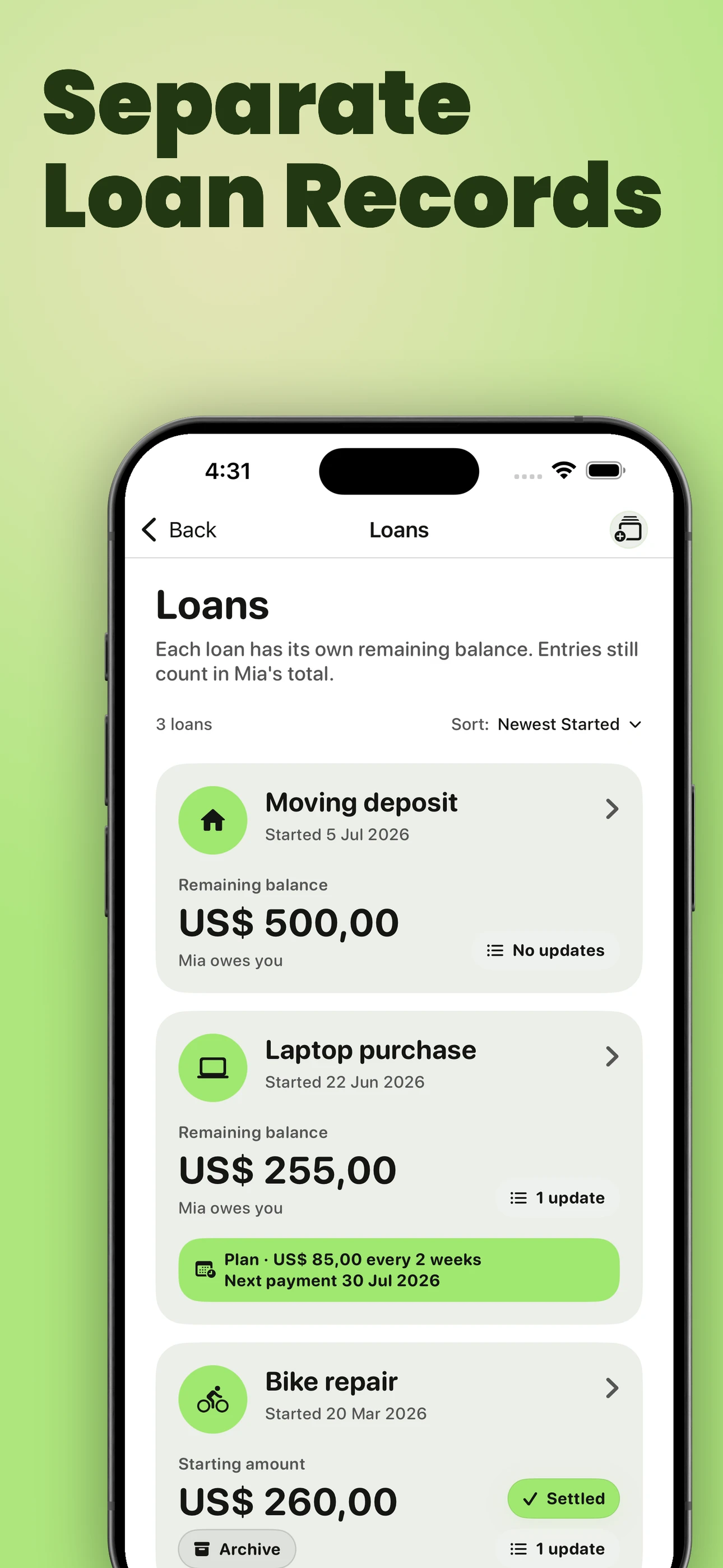
Give each real-world loan its own name, balance, history, status, and optional repayment plan. You can keep “Laptop purchase” separate from “Moving deposit” without losing the complete balance with the person.
Loans organize what is owed. Repayment plans organize how it gets paid back.
Two loans, two clear records, one relationship total
- Laptop purchase —
- 750 remaining
- Moving deposit —
- 400 remaining
- Overall balance with Jordan —
- 1,150
Each loan can keep its own currency, start date, note, visual identity, updates, interest context, and settled state. Every loan update still contributes to the person’s overall balance, so the detail stays precise without hiding the full picture.
Need one balance for mixed IOUs, shared costs, and repayments instead? See how You Owe Me tracks money owed between two people.
Jordan
Laptop purchase
750 remaining
Moving deposit
400 remaining
Overall balance with Jordan
1,150
Choose a repayment plan that fits real life
Start with the decision you can make confidently. You Owe Me calculates the rest before you save the plan.
Compare options
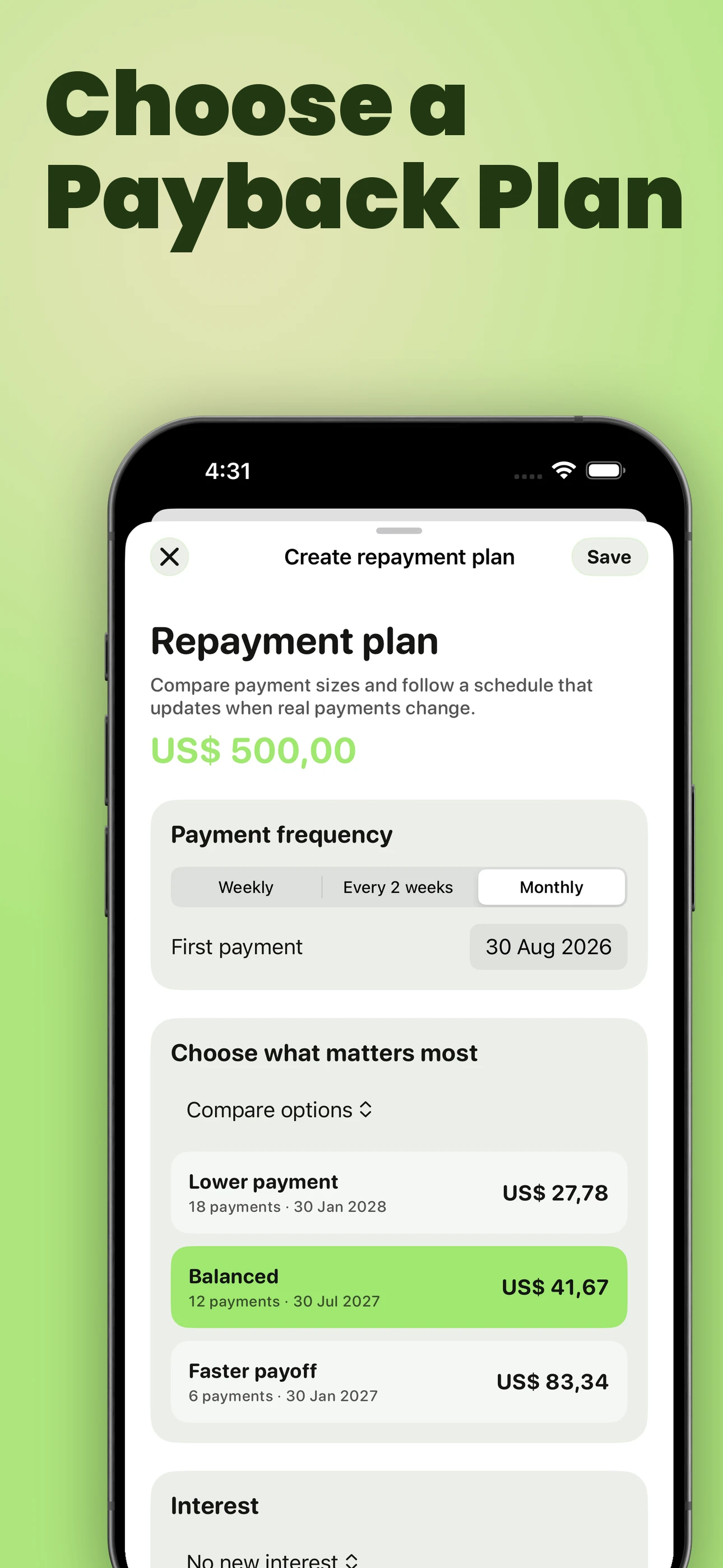
See a lower payment, a balanced option, and a faster payoff. Each option shows the regular payment, number of payments, and projected payoff.
Choose a payment amount
Enter what can realistically be paid each week, every two weeks, or month. The app calculates the number of payments and projected payoff.
Choose a payoff date
Choose when the loan should be finished. The app calculates the regular payment needed at the selected frequency.
Choose the number of payments
Choose how many installments the arrangement should have. The app calculates the regular payment amount.
Before you save, the projection can show the regular payment, number of payments, final payment, projected payoff, projected interest, and total repayment.
Choose weekly, every two weeks, or monthly payments and set the first payment date.
If interest terms have already been agreed, the plan can use no new interest, one fixed total amount, or reducing-balance annual interest. You Owe Me records and calculates the chosen terms; it does not advise whether interest should be charged.
Create a one-time repayment planUse the free calculator when you only need the initial schedule and do not need ongoing payment history or reminders.
Need to agree on the schedule before tracking it? See how to suggest a repayment plan without making the conversation confrontational.
Prefer to start manually? Use the personal-loan tracking guide and copyable record before deciding whether an ongoing app record is necessary.
The loan and the plan use the same record
Every repayment is saved as a real update to the loan. The remaining loan balance and the repayment-plan progress therefore come from the same financial history—not two separate numbers that can silently drift apart.
Record the real payment
Add a payment from the plan, the loan, or the normal entry flow after selecting that loan. The real entry updates what remains.
Reconcile corrections
If a relevant payment is edited or deleted, the app rebuilds the plan from the updated loan history instead of leaving stale progress behind.
Preserve what happened
Changing or ending a plan does not delete the loan or its real payments. Earlier plan versions and completed history remain understandable.
History stays honest. The future stays current.
A reminder that follows the real next payment
The plan reminder is not a repeating alert that keeps using the original amount forever. After a partial, full, or extra payment, You Owe Me updates the reminder to the next unpaid installment, its current remaining amount, and the correct due date.
After a partial payment
| Before the payment | After 150 is paid |
|---|---|
| 200 is due on 1 August | 50 remains on the current installment |
| The reminder refers to 200 | The reminder updates to 50 on 1 August |
| The plan shows the original projection | The plan shows the current payment progress |
The reminder also understands who should act. If you borrowed the money, it reminds you to make the payment. If you lent the money, it reminds you that a payment is expected.
A payment can be recorded from the reminder flow. That real entry updates the loan, the schedule, and the following reminder.
Already partway through the loan? Start from what is true today
You do not need to invent every earlier transaction or rebuild the arrangement from memory. Begin with the amount that is definitely still owed now.
| Question | What to record |
|---|---|
| What is definitely still owed now? | Current remaining balance |
| When did the loan begin? | The real historical start date |
| How much was paid before the app began tracking? | Paid-before-tracking context |
| Which earlier payments are uncertain? | A separate unresolved note |
| What has been agreed for future repayment? | An amount, date, cadence, or next check-in |
You Owe Me can distinguish what was paid before tracking, what has been paid since tracking began, and what remains now—without creating invented historical entries.
Still working out the current starting balance? Calculate what remains after known payments.
See the loan inside the whole financial relationship
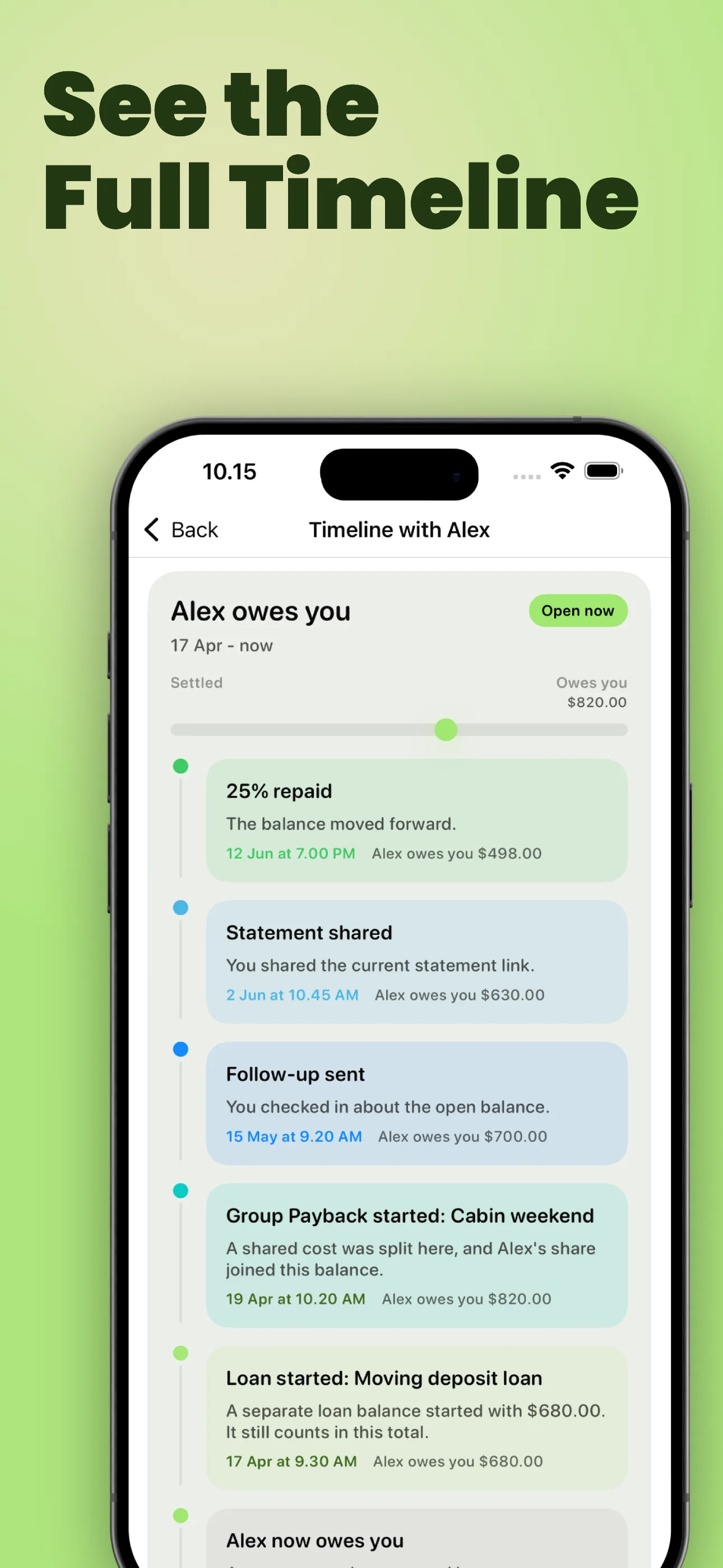
The loan detail answers what is happening with this particular loan. The Timeline shows what has happened between you and the person—and what may need attention now.
The Timeline can bring together:
- A named loan starting or settling
- A repayment plan starting, changing, or ending
- A real payment made or received
- The next payment, a payment due today, or an overdue plan
- A follow-up or repayment update
- A shared statement, PDF, or other record
- A period when everything is settled
A plan-linked payment keeps its loan name and amount instead of appearing as an unexplained transaction. When something needs attention, the Timeline can open the exact plan or the appropriate communication action.
When no action is needed, the Timeline can say that too. Guidance should reduce uncertainty, not create pressure for its own sake.
Share the current understanding clearly
Create a focused PDF loan record and choose whether to include the active or completed repayment-plan summary.
The PDF can include:
- The loan name and people involved
- The initial amount or initial tracked balance
- The remaining balance
- Who owes whom
- Payment and update history
- The regular payment and frequency
- The next payment amount and date
- The current projected payoff
- Relevant interest and plan status
Use it to confirm the current understanding, keep a personal copy, or share clearer context than a screenshot or chat message.
The PDF is a shareable loan record. It is not a binding contract or a regulated bank statement.
Use the lightest method that will stay accurate
You do not need an app for every informal loan. Choose the simplest method that will still be clear after the next real payment.
| Situation | Best fit |
|---|---|
| One small amount, one predictable payment, and no reminder needed | A message or note may be enough |
| The amount is known and you only need the initial installment schedule | Payment Plan Calculator |
| Several known repayments already happened and you only need the current remainder | Partial Repayment Calculator |
| Expenses, repayments, and adjustments moved both ways across the whole relationship | Running Balance Calculator |
| One named loan will continue through payments, reminders, corrections, plan changes, and history | You Owe Me Loan Record and repayment plan |
A record and planning tool—not a lender or payment service
You Owe Me helps one person keep a clear record, plan repayments, follow progress, and communicate the current understanding.
You Owe Me can
- Track a named personal loan
- Record payments and additional borrowing
- Compare and schedule repayment options
- Recalculate plan progress after real changes
- Remind the user about the next relevant payment
- Show the loan inside the wider Timeline
- Share a focused loan record
It does not
- Lend or underwrite money
- Move, withdraw, or collect payments
- Connect to a bank to detect transactions
- Enforce repayment
- Replace a legal agreement
- Guarantee that another person will pay
- Produce a regulated bank statement
- Create a shared two-party repayment contract through Balance Sync
The app records and plans. The people involved still make the decisions and payments themselves.
Keep the loan clear from the next real payment onward
Use You Owe Me when the record needs to continue: every payment should update the balance, the next reminder should stay relevant, and the full history should remain understandable without rebuilding the plan by hand.
One active repayment plan is available free. iPhone app. The app records and plans; it does not move money.
Updated